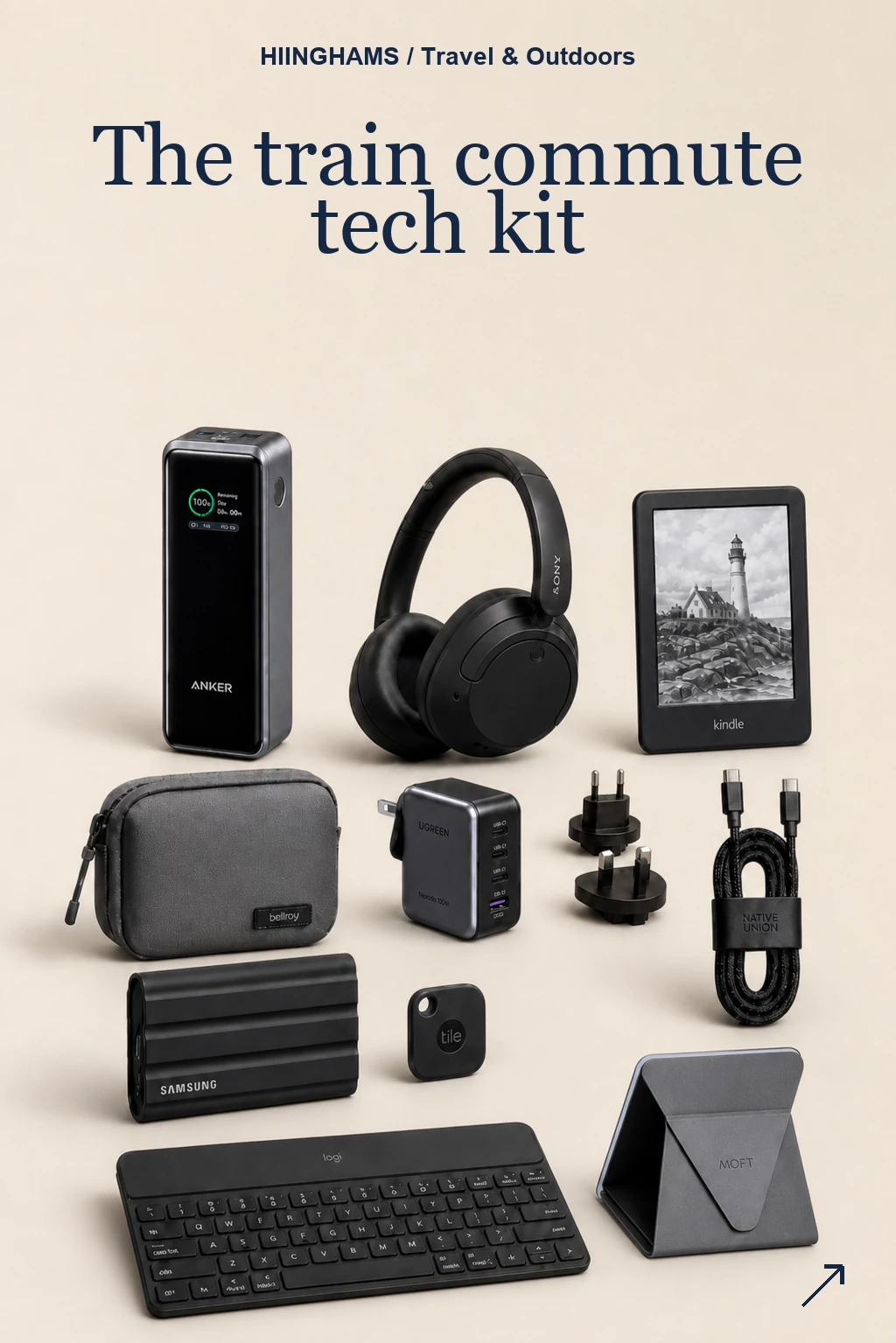
The best commute tech setup is not a second office in your bag. It is a small, reliable layer of power, quiet, reading, cable control and light work tools that makes a train day feel less improvised.
This post contains affiliate links. If you buy through them, Hiinghams may earn a commission at no extra cost to you.
The quick take
Start with power: Pair the Anker 737 with the UGREEN 65W charger and one serious USB-C cable before adding anything clever.
Keep the bag calm: The Bellroy pouch is the difference between a kit and a loose handful of adapters at the bottom of a tote.
Choose one focus mode: Use the Sony headphones for noise or the Kindle for a quieter screen, depending on the kind of journey you actually take.
Work lightly: The Logitech keyboard and MOFT stand are useful after arrival; they should not turn the train table into a fake office.
Recommendations
PICK 1
Anker 737 Power Bank 24K
A high-output power bank that turns delays and socket-free carriages into a non-event. It has enough headroom for a phone, headphones and a laptop top-up without making the kit feel like a travel-office haul.
Best for: Long rail days, low-battery anxiety and routes where plug sockets are wishful thinking.
PICK 2
Sony WH-CH720N Noise Cancelling Headphones
Light over-ear noise cancelling for the part of the commute where you need a bit of distance from the carriage. They are simple, comfortable and easier to justify as an everyday carry than heavier premium travel headphones.
Best for: Calls, podcasts, focused reading and softening the morning carriage noise.
PICK 3
Amazon Kindle Paperwhite 16GB
A calmer screen for dead time: books, saved articles and offline reading without opening the phone loop. It is the least shouty item here, which is exactly why it belongs in a commute kit.
Best for: Reading, decompression and evening journeys where another glowing app is the wrong answer.
PICK 4
Bellroy Tech Kit Compact
The small pouch that stops the whole setup becoming a loose-cable drawer in your bag. Use it for the cable, charger, tracker and backup bits, then move it between work bags without repacking.
Best for: Keeping the daily tech setup tidy between home, train, office and cafe tables.
PICK 5
UGREEN Nexode Pro 65W Travel Charger
One small brick for laptop, phone and earbuds, with travel practicality baked in. It keeps the power setup clean without asking you to carry a separate charger for every device.
Best for: Office days, overnight bags and shared station or meeting-room sockets.
PICK 6
Native Union Belt Cable Pro 240W
A proper USB-C cable with enough length for awkward sockets and enough charging headroom to stay useful as your devices change. The built-in strap matters more than it sounds.
Best for: Charging from train seats, cafe corners and shared desks without making a cable nest.
PICK 7
Samsung T7 Shield Portable SSD 1TB
A rugged little SSD for the files you do not want trapped on one machine or one cloud sync. It is overkill for light email days, but very useful for hybrid work and large media folders.
Best for: Hybrid workers carrying project files, photo libraries or offline backups between desks.
PICK 8
Life360 Tile Bluetooth Tracker
A compact tracker for the things that move between pockets, platforms, lockers and hot desks. It is not glamorous, but it is exactly the sort of quiet safeguard a commute kit should include.
Best for: People rotating between several bags, keys and temporary desks each week.
PICK 9
Logitech Keys-To-Go 2 Portable Keyboard
A slim keyboard for tablet notes, inbox triage and quick edits when opening a laptop feels too much for a narrow train table. It turns a tablet into a more useful commuter tool.
Best for: Tablet-first commuting, light writing and compact temporary desk setups.
PICK 10
MOFT Laptop Stand
A thin folding stand that improves the screen angle without becoming another bulky object in the work bag. It is best for short work blocks rather than pretending a train is a full desk.
Best for: Laptop sessions at cafes, stations and temporary desks after the train.
How to choose
Build the kit around your most common failure point first. If your phone dies, start with battery and charging. If the carriage noise ruins the journey, start with headphones. If your bag is already a mess, buy the organiser before another gadget. The best version is compact, repeatable and easy to move between bags.
A good commute kit should disappear into the routine: charged, tidy, quiet and ready when the train is not.
The shopping list
10 things, well chosen.

Anker 737 Power Bank 24K
A high-output power bank that turns delays and socket-free carriages into a non-event. It has enough headroom for a phone, headphones and a laptop top-up without making the kit feel like a travel-office haul. Best for: Long rail days, low-battery anxiety and routes where plug sockets are wishful thinking.
View product on Amazon
Sony WH-CH720N Noise Cancelling Headphones
Light over-ear noise cancelling for the part of the commute where you need a bit of distance from the carriage. They are simple, comfortable and easier to justify as an everyday carry than heavier premium travel headphones. Best for: Calls, podcasts, focused reading and softening the morning carriage noise.
View product on Amazon
Amazon Kindle Paperwhite 16GB
A calmer screen for dead time: books, saved articles and offline reading without opening the phone loop. It is the least shouty item here, which is exactly why it belongs in a commute kit. Best for: Reading, decompression and evening journeys where another glowing app is the wrong answer.
View product on Amazon
Bellroy Tech Kit Compact
The small pouch that stops the whole setup becoming a loose-cable drawer in your bag. Use it for the cable, charger, tracker and backup bits, then move it between work bags without repacking. Best for: Keeping the daily tech setup tidy between home, train, office and cafe tables.
View product on Amazon
UGREEN Nexode Pro 65W Travel Charger
One small brick for laptop, phone and earbuds, with travel practicality baked in. It keeps the power setup clean without asking you to carry a separate charger for every device. Best for: Office days, overnight bags and shared station or meeting-room sockets.
View product on Amazon
Native Union Belt Cable Pro 240W
A proper USB-C cable with enough length for awkward sockets and enough charging headroom to stay useful as your devices change. The built-in strap matters more than it sounds. Best for: Charging from train seats, cafe corners and shared desks without making a cable nest.
View product on Amazon
Samsung T7 Shield Portable SSD 1TB
A rugged little SSD for the files you do not want trapped on one machine or one cloud sync. It is overkill for light email days, but very useful for hybrid work and large media folders. Best for: Hybrid workers carrying project files, photo libraries or offline backups between desks.
View product on Amazon
Life360 Tile Bluetooth Tracker
A compact tracker for the things that move between pockets, platforms, lockers and hot desks. It is not glamorous, but it is exactly the sort of quiet safeguard a commute kit should include. Best for: People rotating between several bags, keys and temporary desks each week.
View product on Amazon
Logitech Keys-To-Go 2 Portable Keyboard
A slim keyboard for tablet notes, inbox triage and quick edits when opening a laptop feels too much for a narrow train table. It turns a tablet into a more useful commuter tool. Best for: Tablet-first commuting, light writing and compact temporary desk setups.
View product on Amazon
MOFT Laptop Stand
A thin folding stand that improves the screen angle without becoming another bulky object in the work bag. It is best for short work blocks rather than pretending a train is a full desk. Best for: Laptop sessions at cafes, stations and temporary desks after the train.
View product on Amazon